
IPBases 2.1.1: the system now tells each person what to do next
2.1.1 turns the dashboard into a to-do list worked out from your own records, stops the same trademark being entered twice, and shows the whole team’s work as it happens.
Your next steps
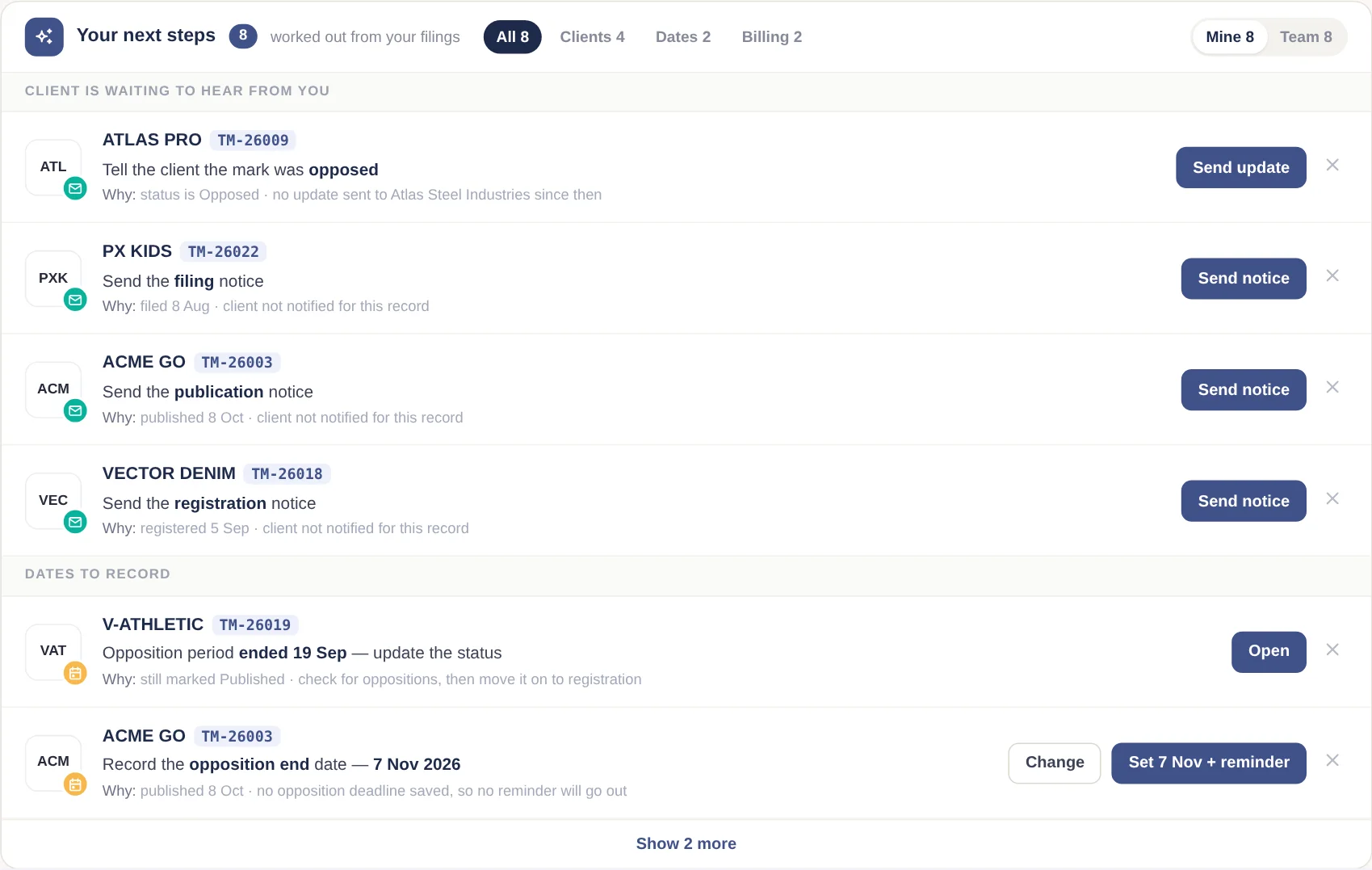
Most missed work in an IP practice is not a missed office deadline — it is the small step nobody wrote down: the acceptance letter that was uploaded but never sent to the client, the publication with no opposition end date, the filing that was never invoiced. IPBases now finds these by itself.
Every morning, each person sees the steps for the trademarks they added or are assigned to; managers can switch to the whole team. The rules are fixed and visible, not guesswork:
- Client is waiting to hear from you — the latest stage the mark reached (filing, acceptance, publication, registration) has no notice to the client yet, or the mark was opposed and the client has not been told.
- Dates to record — a published mark with no opposition end date (suggested from the publication date, with a reminder), a missing acceptance or publication date, or an opposition period that ended while the mark is still marked Published.
- Billing — a filed mark with nothing invoiced on it.
- Worth a check — a possible duplicate, or the same file saved under two different categories.
The button does the step: Send notice opens the client update with the right letter selected; Set date + reminder saves the date and creates the reminder. A suggestion disappears when the step is done, or when you mark it “not needed”.
Action required, and a header that shows what is due
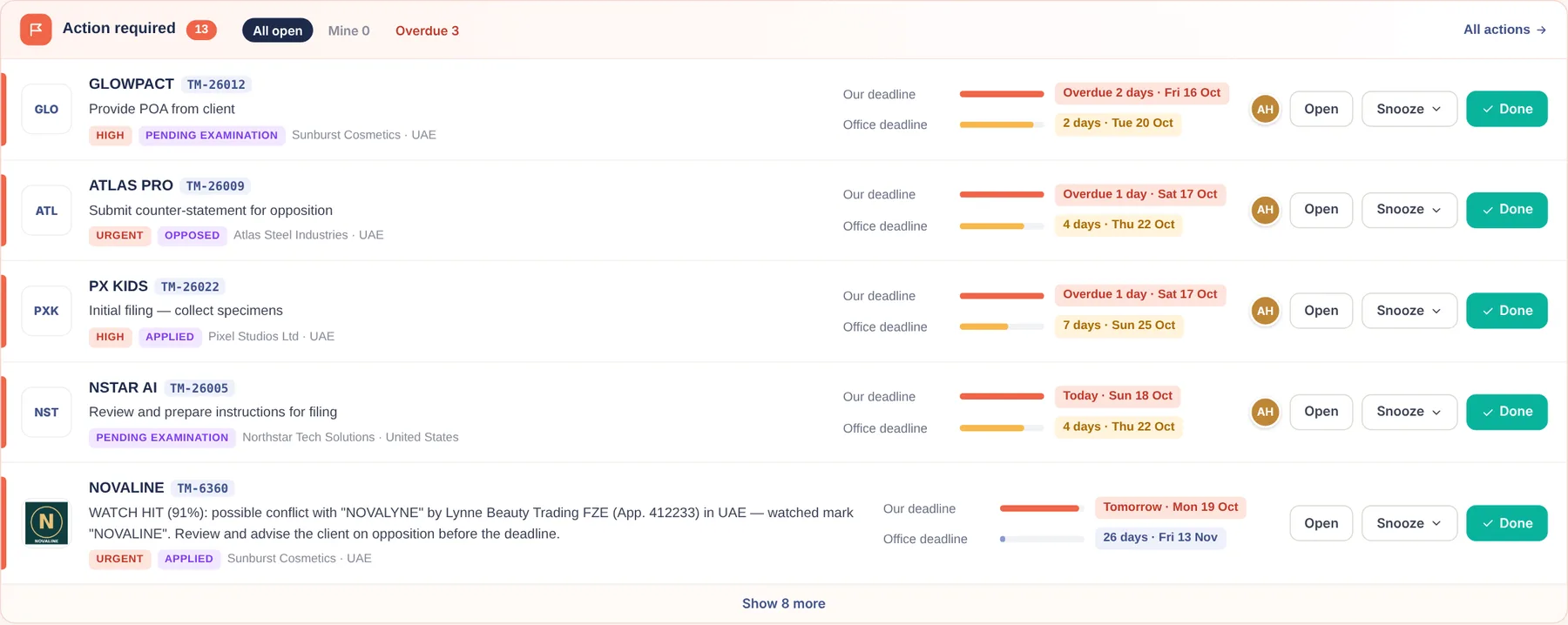
Open actions now sit at the top of the dashboard with two deadline bars — your internal date and the office’s hard date — and buttons to open, snooze for a day, three days or a week, or mark done. The header shows a single “Actions due” pill in red, amber or calm blue, so the most important number is visible on every page. The bell is now for personal alerts only, such as an action assigned to you.
Duplicate trademark warning
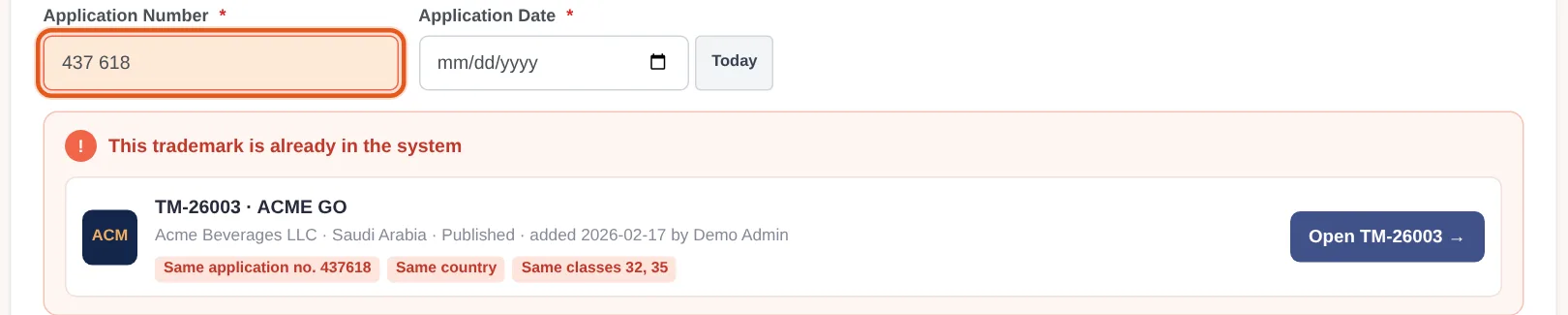
When two people record the same filing, deadlines and invoices double up. IPBases now checks while you type: same country and the same application or registration number — ignoring spaces, dashes and leading zeros — and compares the classes. A red card means the same number and classes; amber means the same number with different classes, or the same client and name with a shared class. You can still save with a reason, and the reason goes into the audit log. A “Possible duplicates” tab on the trademark list finds any that already exist.
And when one mark really is filed class by class, the new Duplicate this trademark button creates the copy with the same details and empty classes, ready for the next filing.
Live team activity
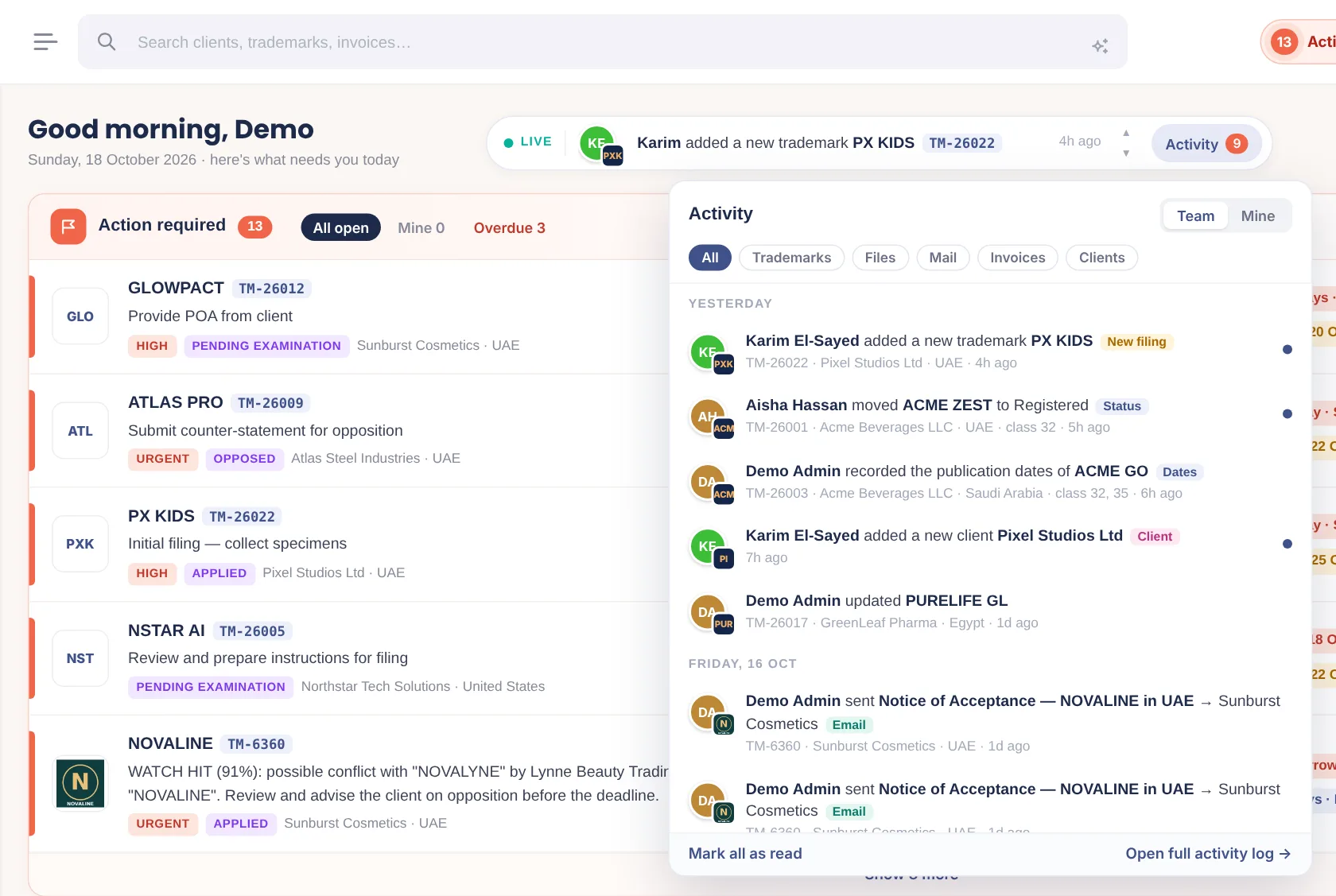
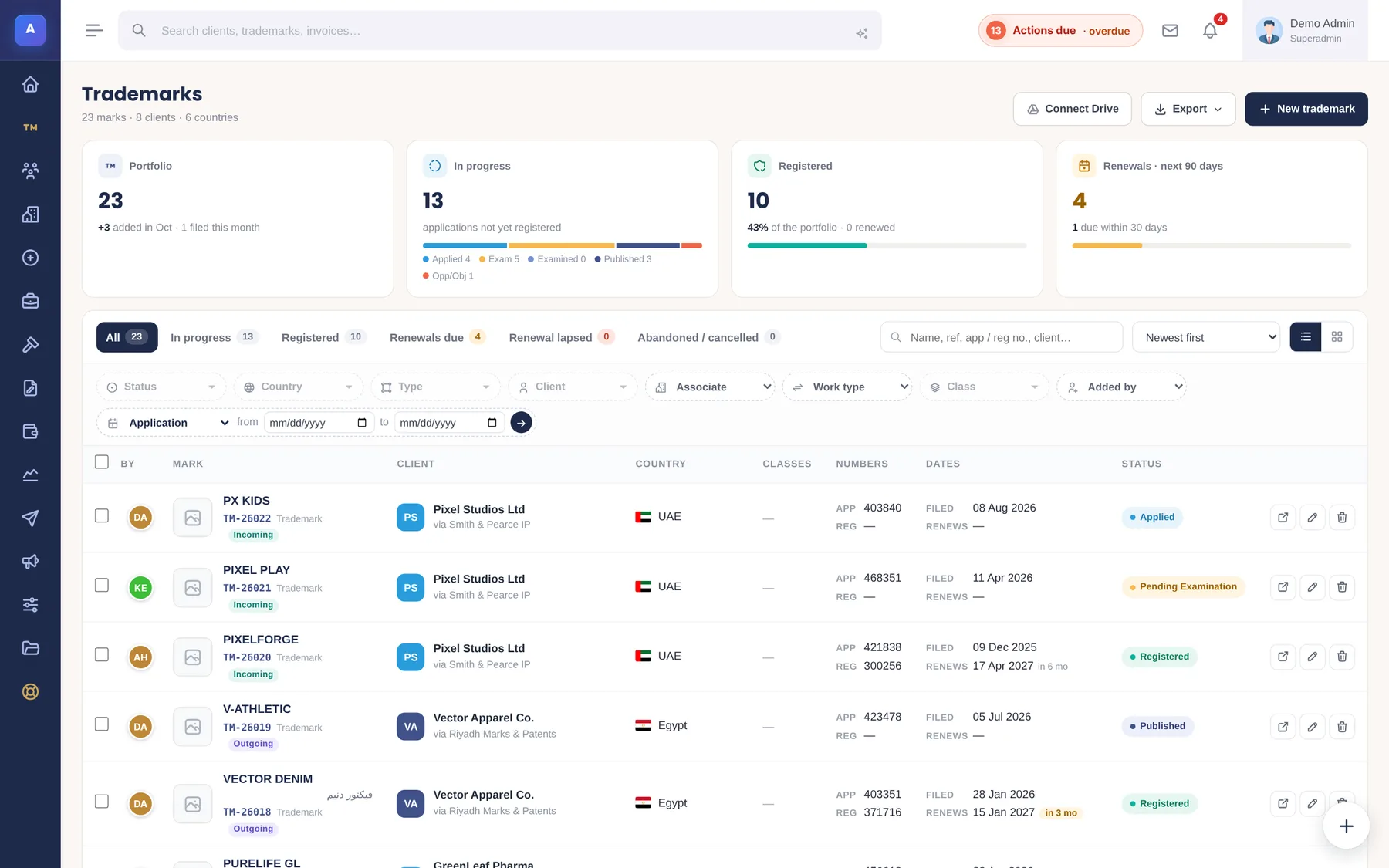
A one-line ticker on the dashboard shows the latest work across the firm — who added a mark, moved it to Registered, emailed a client or created an invoice — with the person’s avatar and the trademark’s logo. Open it for the full feed, filtered by trademarks, files, mail, invoices or clients. The trademark list also shows who added each mark, with an “Added by” filter.
A rebuilt audit log
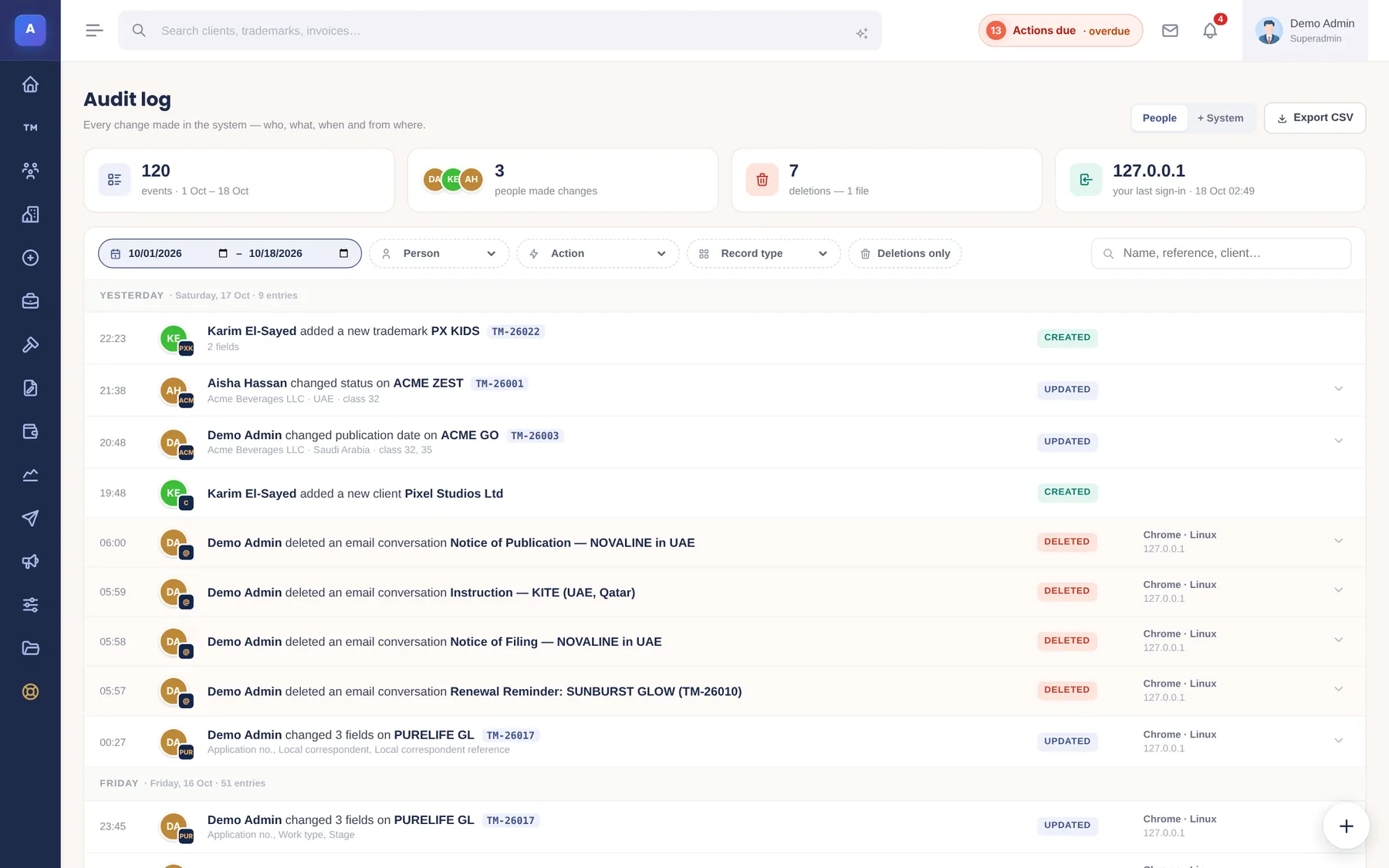
Every change is now written as a sentence — “Aisha changed status on ACME ZEST” — grouped by day, with the old and new values, the device and the place of sign-in. Filter by person, action, record type or deletions only, hide system events with one switch, and export to CSV.
Fixed and hardened
2.1.1 also follows a full review of the code and database. Highlights: safer handling of uploaded SVG files and links, stricter permissions on settings and the audit log, private emails no longer copied to the firm inbox, temporary sign-in links that end when revoked, correct amounts for three-decimal currencies in online payments, reminders that skip abandoned marks and use the balance still due, and uploaded files removed from storage when their record is deleted.
Licenses within their update period get 2.1.1 free. See pricing or the price comparison.
IPBases 2.1.1 FAQ
What is 'Your next steps' in IPBases?
A dashboard card that reads each trademark's record — its stage, dates, uploaded files, emails sent and invoices — and lists what the person handling it should do next, with the reason and a one-click button: send the notice the client hasn't received, record a missing date, invoice a filing, or check a possible duplicate.
How does the duplicate trademark warning work?
While you type, IPBases checks for a mark in the same country with the same application or registration number, ignoring spaces, dashes and leading zeros. Same number and same classes is shown in red; same number with different classes, or the same client and name with a shared class, in amber. You can still save with a reason, which is recorded in the audit log.
Is 2.1.1 a free update?
Yes, for licenses within their update period. It installs over 2.1 and keeps all data and settings.
See 2.1.1 on sample data
Open the live demo, or book a 30-minute walkthrough with your own marks.
Book a demo → See pricing →