
Your clients’ files, guarded at every layer.
IPBases runs on your own server, behind Cloudflare, with files in your own Amazon S3 or Cloudflare R2 bucket and an encrypted backup every day. Every request passes five layers of protection before it reaches a record.
- Cloudflare
- Amazon S3
- Cloudflare R2
- Google Drive
Your clients’ details stay on your server, under your key
IPBases is installed on a server you own or rent. We don’t host your records, and we can’t open them. The most sensitive values are encrypted with AES-256-GCM using a key that belongs to your installation alone.
- Client
- Harbor Line Trading LLC
- ID / CR number
- CR-4471902
- Mail password
- Saved · sending works
- Storage secret key
- Saved · files open
- name
- Harbor Line Trading LLC
- id_number
- enc:v1:YpRWnazLGvxaT0q9…
- smtp_password
- enc:v1:Z/0AQAI7mKdw1r…
- storage_s3_secret_key
- enc:v1:9LpJhQZc2Ue8Hf…
On your own server
Your cPanel host or VPS, in the country you choose. No shared database with other firms, and no copy kept by us.
Encrypted where it matters
Every stored password and API key, client ID numbers, and every backup before it leaves the server. Staff passwords are kept only as bcrypt hashes.
Your key, not ours
Each installation makes its own random key. An administrator downloads a recovery copy after confirming their password, and each download is logged.
Files in your own bucket
Scans and certificates go to your private Amazon S3 or Cloudflare R2 bucket, encrypted at rest by the provider, and open only through links that expire after five minutes.
Names, addresses and portfolio details stay readable to IPBases so search, letters and reports work. On a VPS, the database server can also encrypt its own files on disk; IPBases’ System check shows whether it is on.
Five layers between the internet and your records
Each request passes through all five, in this order. If one layer fails, the next still stands.
- The edge
Cloudflare in front of your server
Traffic reaches IPBases through Cloudflare, which handles HTTPS, filters attacks and applies your firewall rules. IPBases trusts Cloudflare’s visitor address and country only when the request really comes from a Cloudflare address, so nobody can fake them.
- The server
A machine you control
IPBases runs on your own cPanel host or VPS. A built-in firewall bans abusive addresses and slows down bots, and repeated sign-in attempts are limited.
- Sign-in
Passwords and places
Passwords are stored only as bcrypt hashes. A sign-in from an unexpected country needs a six-digit code sent by email, and a browser can be trusted for a set number of days.
- The code
Defended on every request
Every form carries a CSRF token, every query is parameterised, uploads are checked by their real file type, and every page is sent with strict security headers.
- Your data
Encrypted, stored, backed up
Stored passwords and API keys, client ID numbers and backups are encrypted with AES-256-GCM under your installation’s own key. Files sit in your Amazon S3 or Cloudflare R2 bucket and open through signed links that expire.
Secure by default, not by setting
These protections are written into IPBases itself. There is nothing to switch on and nothing a busy administrator can forget.
- CSRF token checked on every form and action
- Parameterised queries for every database call
- Uploads checked by their real file type, not the name
- Passwords and one-time codes stored as bcrypt hashes
- Every stored password and API key, client ID numbers and backups encrypted with AES-256-GCM
- Firewall with IP bans and bot throttling
- Session cookies that scripts cannot read and other sites cannot send
Strict-Transport-Security: max-age=31536000; includeSubDomainsContent-Security-Policy: default-src 'self'; object-src 'none'; …X-Frame-Options: SAMEORIGINX-Content-Type-Options: nosniffReferrer-Policy: strict-origin-when-cross-originPermissions-Policy: camera=(), microphone=(), geolocation=()Set-Cookie: session=…; Secure; HttpOnly; SameSite=Lax
Off the server, every day
If a server fails, your data is somewhere else. Files and backups live in your own cloud storage, under your account and your keys.
- Every nightThe database is exported on the schedule you set.
- CompressedThe export is gzip-compressed to a small file.
- EncryptedIt is encrypted with AES-256-GCM under your installation’s own key.
- Sent to storageIt goes to your Amazon S3 or Cloudflare R2 bucket, away from the server.
- PrunedCopies older than your retention period are removed.
Your bucket, your keys
Choose Amazon S3 or Cloudflare R2 in settings and every new file goes to your bucket. IPBases never holds a copy, and we never see your access keys.
Links that expire
When someone opens a document, IPBases creates a signed link that works for a short time only. A forwarded link stops working on its own.
Google Drive too
Optionally sync each mark’s folder to the firm’s Google Drive, so the team has a familiar copy outside IPBases.
Who can see and do what
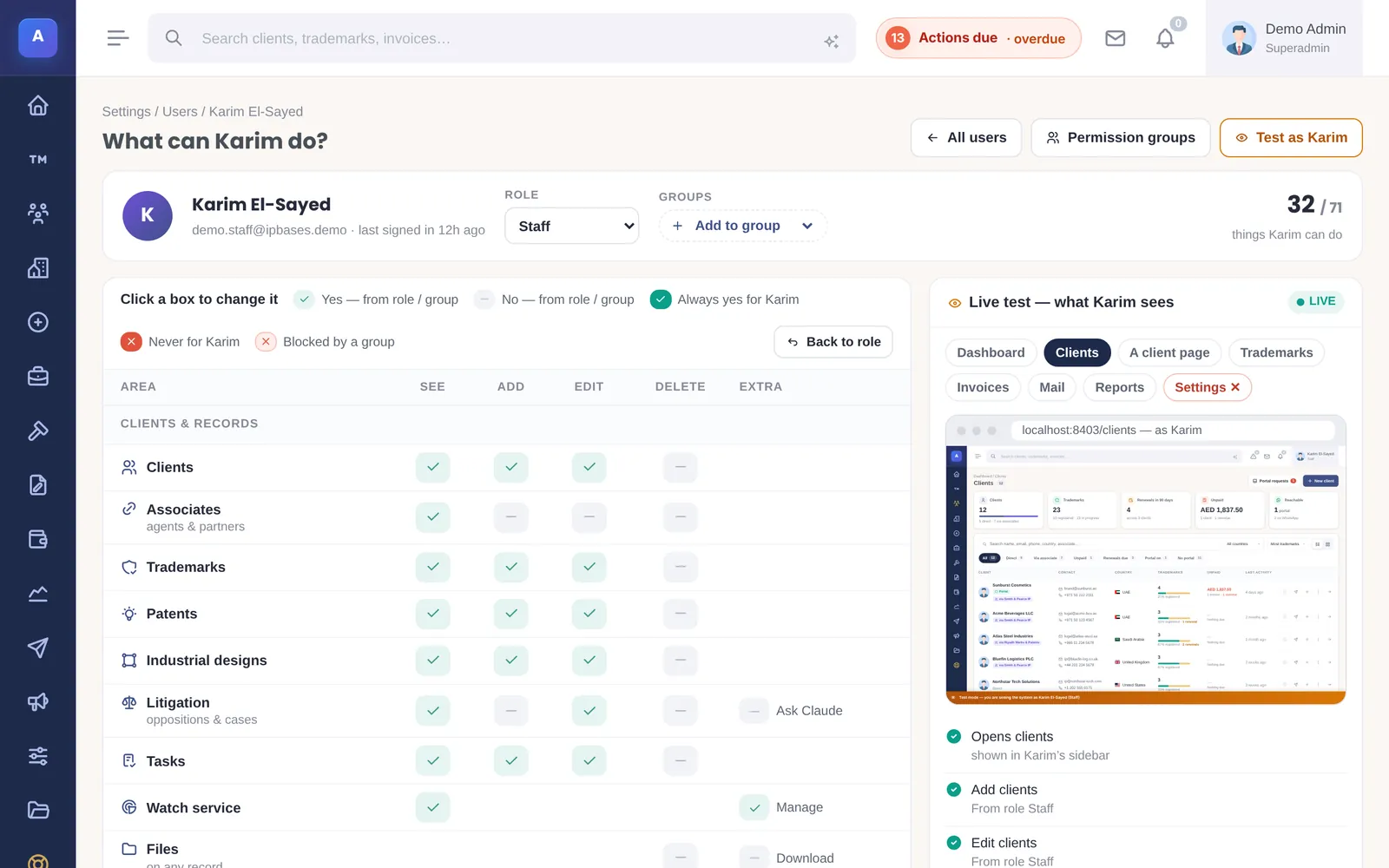
Access follows the person’s role, the groups they belong to and any rules set for them. A “Never” rule overrides everything else.
- Five built-in roles, permission groups and per-person Allow and Never rules
- A live preview of exactly what a colleague can see
- Single-use password reset links that expire
- Client and associate portals where each person sees only their own records
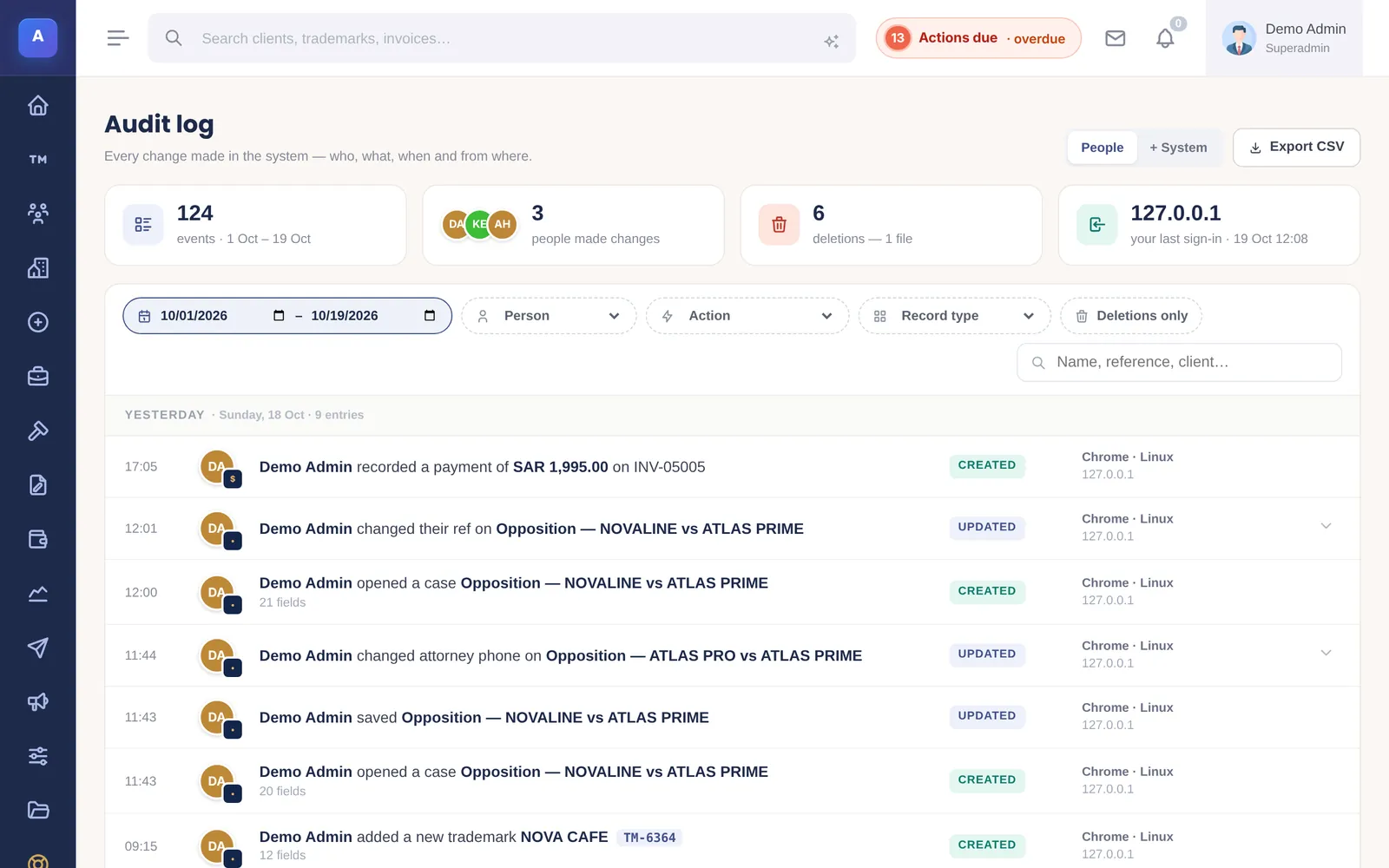
A record of every change
The audit log answers “who changed this, and from what?” for every record in the system.
- Every create, update and delete, with the values before and after
- Who, when, from which device and IP address
- Filter by person, action, record and date; export to CSV
What IPBases does not do
No telemetry
IPBases does not report how many records you have, how often you log in or which features you use.
No support backdoor
We have no master password to your installation.
No data pooling
Your clients and portfolio are not combined with anyone else’s or used for benchmarks.
Licence checked offline
An Ed25519-signed licence tied to your domain is verified on your server. Nothing phones home.
AI only when you switch it on
The optional Claude features are off by default. With the firm’s own Anthropic API key, only the records needed for a question are sent.
Found a security issue?
Email [email protected] with the details. We acknowledge within 48 hours and work with you on coordinated disclosure. Confirmed issues are credited, with your permission, in the release notes.
Security fixes ship as patches with reversible database updates. Critical fixes are backported to older supported releases for 18 months.
See how it would sit on your infrastructure
We’ll go through Cloudflare, storage, backups, access and the audit log with your IT contact.
Message us on WhatsApp or email [email protected].