
Renewals and reminders
How IPBases keeps track of renewal dates, reminds clients and associates on time, and records each renewal, and what else changes when it does.
- ReportReports › Renewals & Deadlines
- SettingsSystem Setup › Email & Automation › Automation
- WordingSystem Setup › Email & Automation › Email templates
- PermissionsReports to view and remind; Edit trademarks to renew or lapse
Where the renewal date comes from
Every trademark has a renewal date on its record. When you create a trademark with a renewal date, IPBases also opens its first renewal cycle, so the mark appears in the renewals report and in reminders from then on.
When a mark is renewed, the next renewal date is worked out from the country’s renewal period (ten years unless the country is set differently), or you can type the new date yourself.
Sending a reminder by hand
Open the trademark and choose Send renewal reminder. The email goes to whoever is billed for the mark:
- If the client is billed through an associate, the associate receives it.
- Otherwise the client receives it, at every email address on their record.
The wording comes from the Renewal reminder email template. If the mark has an Arabic name, the Arabic version is used. The email is kept in the mail log and the audit log.
You need a working mail setup (Mailgun or SMTP) and permission to edit trademarks.
Automatic reminders
IPBases can send renewal reminders on its own. Every day it looks for marks whose renewal date is a set number of days away and emails the person who is billed, exactly as a manual reminder would.
- Reminder windows: 90, 60 and 30 days before the renewal date by default. You can change them.
- Template: Renewal reminder by default, or another template you choose.
- Your team: staff can also get an in-app alert for each window, depending on their notification preferences.
- No repeats: each mark gets one reminder per window, even if the daily run happens twice.
Turn this on in System Setup › Email & Automation › Automation. Run now on the same page sends anything due straight away. The daily run needs the cron job from the installation guide.
The renewals report
Reports › Renewals & Deadlines shows every renewal in one place, with totals for the next 30 days, 90 days and 12 months, and a chart of renewals per month.
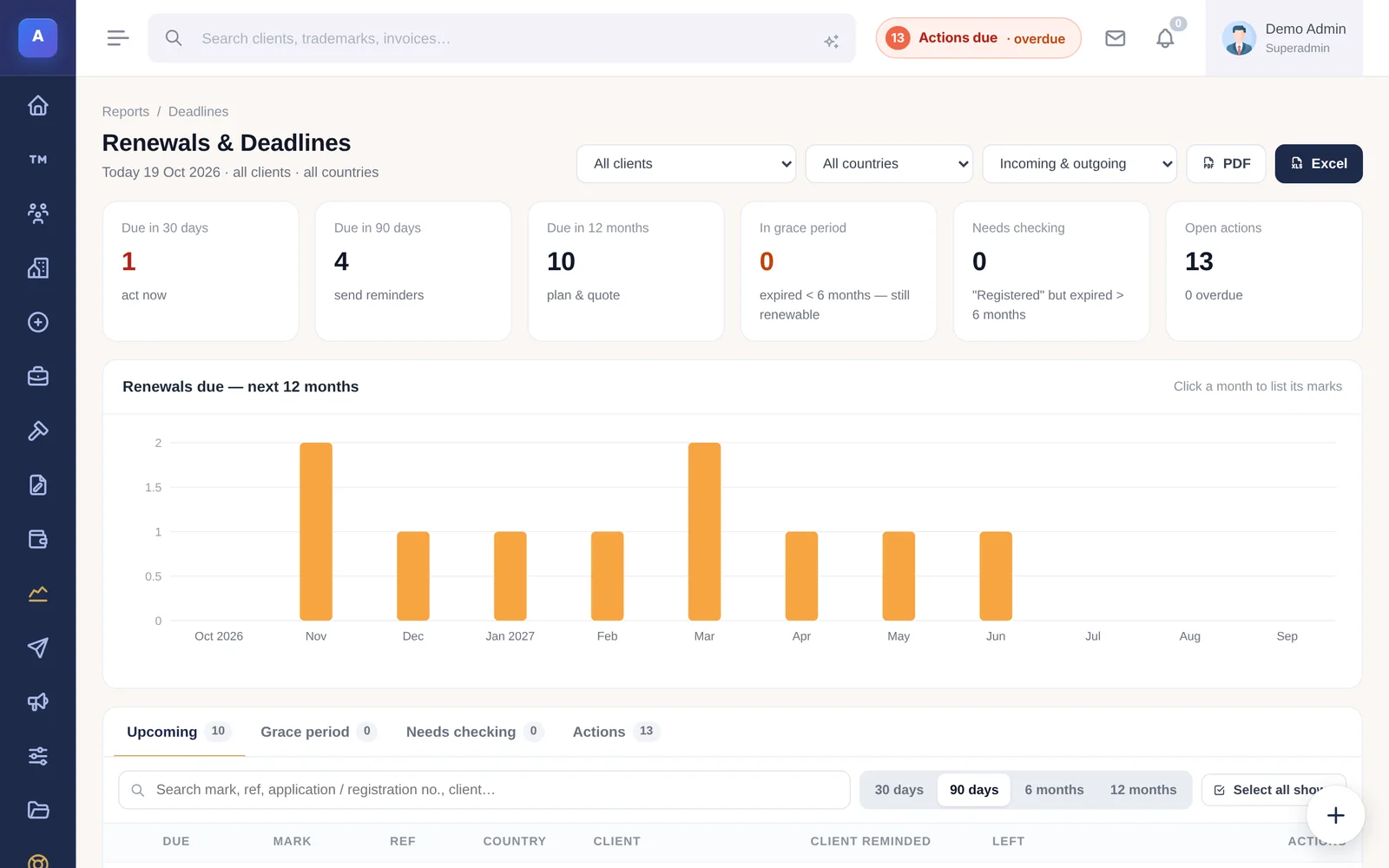
- Upcoming: marks due in the next 30 days, 90 days, 6 months or 12 months.
- Grace period: live marks whose renewal date passed within the last six months and can still be renewed.
- Needs checking: marks still shown as live although the renewal date passed more than six months ago.
- Actions: every open action, so deadlines and renewals sit side by side.
Filter by client, country or text, and export to PDF, Excel or CSV. Each row shows when the client was last reminded.
Reminding, renewing and lapsing in bulk
- Remind sends one email per client listing all of their marks in the period, rather than one email per mark. In the grace period the wording changes to say the date has passed.
- Mark renewed sets the status to Renewed, moves the renewal date forward and opens the next cycle.
- Mark lapsed sets the status to Abandoned or Cancelled, so the mark stops appearing in reminders.
Select several rows to do this for many marks at once. Reminding needs the Reports permission; renewing and lapsing need permission to edit trademarks.
How it connects
This part of IPBases takes information from the parts on the left and changes what appears in the parts on the right. When you change one of them, check the other.
Uses
- TrademarksThe renewal date, country and status of each mark
- Clients and associatesWho is billed decides who receives the reminder
- Email templatesThe Renewal reminder wording, in English and Arabic
- MailSends the reminders and keeps them in the mail log
- AutomationReminder windows, template and the daily run
Affects
- ReportsThe renewals report and renewals due in the Executive Brief
- Client and associate portals“Coming up for renewal” on each portal
- Dashboard and notificationsIn-app alerts for staff in each window
- Trademark statusMark renewed or lapsed changes the status and next date
- Audit logEvery reminder and status change is recorded
Something unclear or out of date? Email [email protected].