
Client updates and notices
How to tell a client or associate what happened on a mark: pick the milestone, check the email, letter and certificate, and send it by email or WhatsApp.
- On a markFiling wizard step 4, Client updated
- WordingSystem Setup › Email & Automation › Email templates
- CertificateSystem Setup › Branding › Registration certificate
- PermissionsEdit trademarks to send updates
Pick the milestone
Open step 4 of the filing wizard, Client updated, and choose what the update is about:
- Filing, Acceptance, Publication, Registration, Certificate
- Documents needed, Refusal
- Publication fee reminder, Registration fee reminder
- Custom message, for anything else
IPBases suggests the next milestone from the mark’s status, and ticks the ones already sent with the date. Only the fields that milestone needs appear: a gazette number and date for publication, a date for acceptance and registration, a deadline for refusals and reminders, an invoice number and amount for fee reminders. For publication, the end of the opposition period is filled in for you.
English or Arabic
Switch between EN and عربي to write the whole update, email and letter, in either language from the same record. Fill in who it is addressed to and their title, and the greeting follows.
Check it before it goes
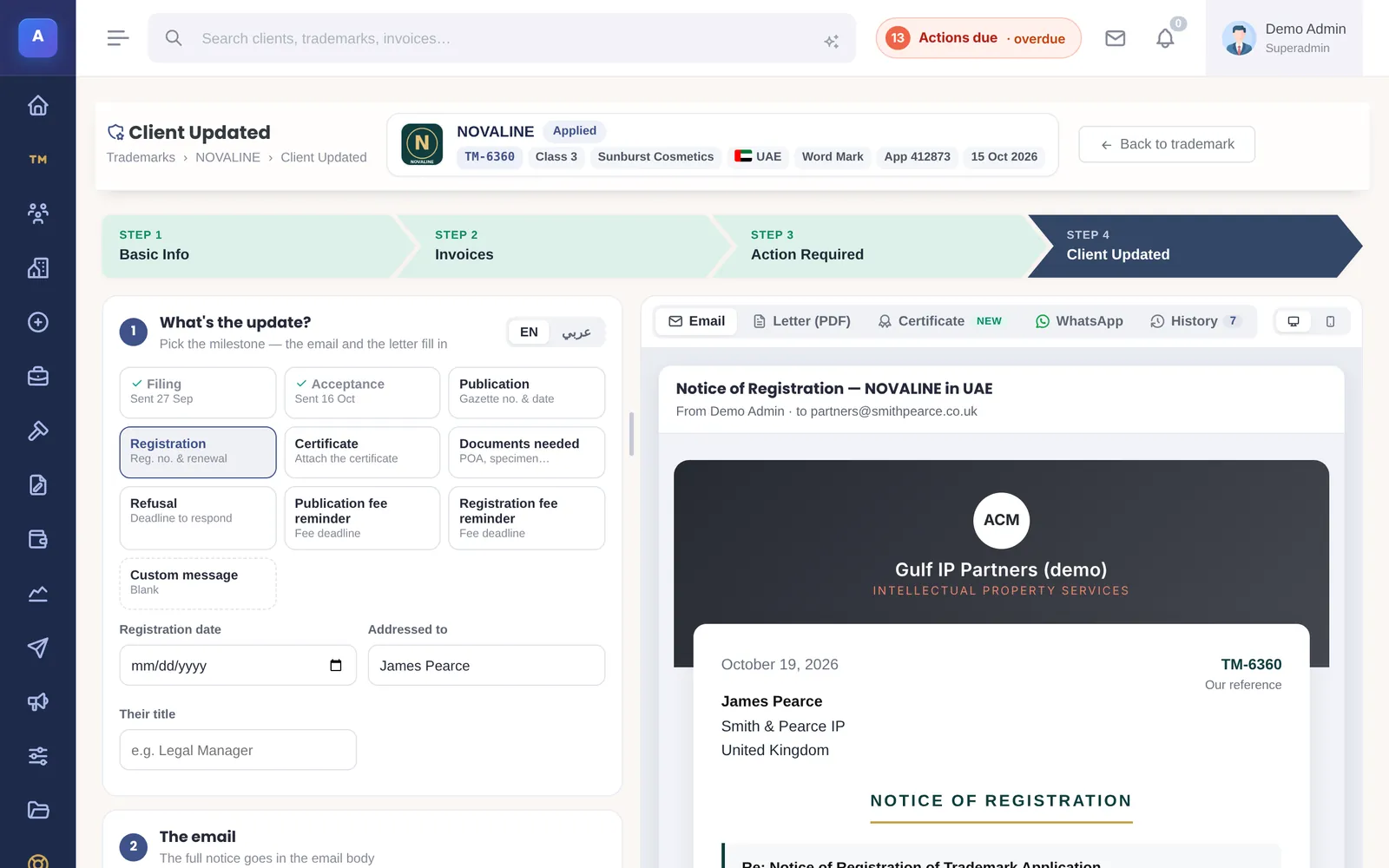
The preview on the right has tabs for the Email, the Letter (PDF) on your letterhead, the Certificate, the WhatsApp message and the History of updates on this mark. The email carries the full notice, and the Letter (PDF) tab gives the same notice on your letterhead. A custom message goes out as a short email. You can edit the text before sending.
The registration certificate
For Registration and Certificate notices on trademarks, IPBases draws a “Trademark Registered” certificate from the mark’s record and attaches it to the email. Choose the design in the Certificate tab. Its wording, emblem, signer and seal are set in System Setup › Branding › Registration certificate.
Who receives it and how
If the mark came through an associate, IPBases sends the update to the associate by default and tells you so; you can switch to the client directly. Add more email addresses if needed, and attach files from the mark.
- Send emails it with your signature.
- WhatsApp opens the message for the saved WhatsApp number. WhatsApp cannot carry attachments, so send the email for the PDF.
- Log only records it in the history without sending.
Every update, including failed sends, is kept in the history and the mail log.
How it connects
This part of IPBases takes information from the parts on the left and changes what appears in the parts on the right. When you change one of them, check the other.
Uses
- Trademarks and the filing wizardNames, numbers, classes, dates and the logo
- AssociatesMarks that came through an associate go to them first
- Email templatesThe wording of each milestone, in English and Arabic
- Branding and designsLetterhead, email colours and the certificate design
- Files and Google DriveDocuments you can attach
Something unclear or out of date? Email [email protected].