
Users and permissions
Roles, permission groups with Allow and Never rules, a live preview of what each person sees, and the audit log.
- UsersSystem Setup › People & Security › Users & permissions
- GroupsUsers & permissions › Permission groups
- Audit logSystem Setup › System › Audit log
- PermissionsManage users (Owners and Administrators by default)
Roles
Every person has one of five roles, which sets what they can do by default:
- Owner: can do everything. This cannot be narrowed.
- Administrator: everything by default, including settings, but can be narrowed.
- Manager: runs the day-to-day work: clients, associates, trademarks, cases, tasks, invoices, offers and payments, email and reports, without deleting billing records or changing settings.
- Staff: works on records: views and edits clients and trademarks, creates invoices, sends email from templates and views reports.
- Read-only: can look at everything they are allowed to see, but change nothing.
Only an Owner can create or edit another Owner. Changing someone’s role resets any rules set just for them.
Permission groups
Groups add or remove access for several people at once. Each group has an Allow list and a Never list, and groups stack: a person can belong to several. Two starter groups are included, Finance Access and No Financials.
A “Never” always wins. If any of a person’s groups, or a rule set just for them, says Never, they cannot do it, whatever their role says.
What can this person do?
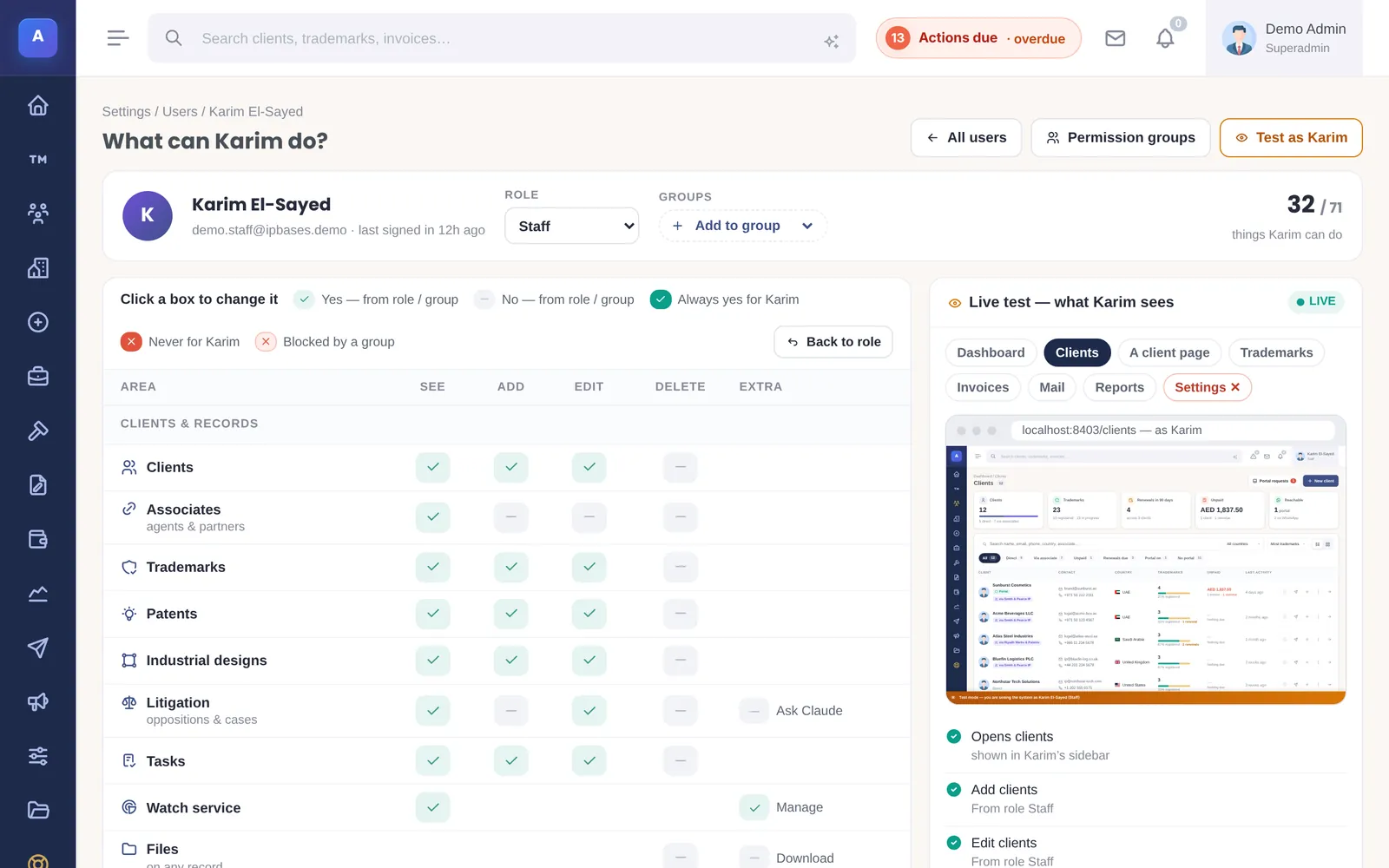
Open a user to see exactly what they can do, area by area: see, add, edit and delete for clients, associates, trademarks, patents, designs, cases, tasks, invoices, payments, offers and proposals, plus extras such as money on the dashboard, Ask Claude, email marketing and settings. Click a box to change it, set it back to the role’s default, or mark it always yes or never for this person.
The live test beside it shows the system as that person will see it, updating as you click. Test as lets an Owner or Administrator sign in as a lower-ranked colleague to check, and return to their own account.
Sign-in protection
Passwords are stored only as secure hashes. With login security switched on, a sign-in from outside your allowed countries needs a six-digit code sent by email, and a browser can be trusted for a set number of days. See Sign-in and security.
Temporary access links sign a colleague in automatically for a limited time (15 minutes to 24 hours), optionally a set number of times. They can never be created for an Owner.
The audit log
Every create, update and delete is recorded with who did it, when, and the values before and after. Filter by action, record type, person or date, and export to CSV. Each user also has an activity page showing their own recent work.
How it connects
This part of IPBases takes information from the parts on the left and changes what appears in the parts on the right. When you change one of them, check the other.
Uses
Affects
- Dashboard and next stepsMoney figures appear only for people allowed to see them
- Invoices and paymentsWho may create, edit and delete invoices
- ReportsWho may view and export reports
- TrademarksWho may add, edit and delete marks
- Cases and litigationWho may use Ask Claude on case files
- System check and licenceAdmin pages need the matching admin permission
Something unclear or out of date? Email [email protected].