
Automatic trademark deadlines: how docketing rules work, country by country
Most missed trademark deadlines are not forgotten: they were never entered. A date arrives in an office letter, someone updates the record, and the action that should follow depends on that person remembering it. Docketing rules take the remembering out of it.
Why manual docketing misses deadlines
In most firms, a trademark record and its deadlines are two separate jobs. The publication date goes into the record; the opposition deadline goes into a calendar, a spreadsheet or a task list, if someone thinks of it. The gaps are predictable:
- The date is entered, the action is not. The record is right; the docket is empty.
- The date changes, the action does not. An office corrects a publication date and the old deadline stays on the calendar.
- Nobody owns it. The action exists but is not assigned, so everyone assumes someone else has it.
- Every office is different. Response periods, opposition windows and fee deadlines vary by country, and the knowledge lives with whoever handles that country.
What a docketing rule is
A docketing rule is a sentence the system follows: when this happens on a trademark in this country, create this action, due this long after, for this person. A complete rule has six parts:
| Part | Example |
|---|---|
| Trigger | Publication date entered |
| Action | Opposition period ends: report to the client |
| Office deadline | 30 days after the trigger |
| Internal date | 7 days before the office deadline |
| Assigned to | Who added the mark, who entered the date, or one named person |
| Priority | Normal, high or urgent |
The numbers above are an example, not legal advice: periods differ by office and change over time, so every rule should be set by someone who knows that office’s current practice.
Triggers: dates, statuses and chains
Good rules react to the events that really start a deadline:
- A date entered: filing, publication, acceptance or registration.
- A status set: for example “Objected” or “Refused”, counted from the day the status is set.
- A date passing: the renewal date, for the grace period that follows it.
- Another rule: “pay the registration fee 30 days after the opposition period ends” counts from the first rule’s office deadline, so the chain follows the facts.
What should happen when dates change
This is where simple reminder tools fall down. A rules engine for docketing should handle the whole life of the date, not just its first entry:
- The date is changed: the open action moves, and so do the actions that follow from it.
- The date is cleared: the open action it created is removed.
- The record is saved again with no change: nothing new is created.
- A date is typed in whose deadline has already passed: nothing is created, so old records do not flood the docket.
- The action is still an ordinary action: people can edit, re-assign, complete or cancel it.
Two dates on every deadline
An office deadline is the last day the office accepts something. Working to it is how deadlines get missed. Each action should carry two dates: the office deadline, and your own earlier date, which reminders and overdue warnings use. A single “your date” setting per country (for example 7 days before) keeps this consistent without asking anyone to calculate it.
Setting up rules safely
- Start with one country, the one with the most marks.
- Write down the office events your team already acts on: objections, refusals, publication, registration fees, renewals.
- Have the person who handles that office confirm every period against current practice.
- Use the example view: enter a sample date and check each action and date it would create.
- Switch rules on one at a time and watch the first week of actions.
- Copy the rules to similar countries, then adjust the periods for each office.
Deadline rules in IPBases
IPBases 2.2 adds deadline rules per country in System Setup, with every trigger above, chains between rules, assignment to the person who added the mark, the person who entered the date or a named person, and a “your date” setting per country. Rules work from the trademark form, status changes, Next steps and client updates, and the actions they create carry a small “Deadline rule” tag.
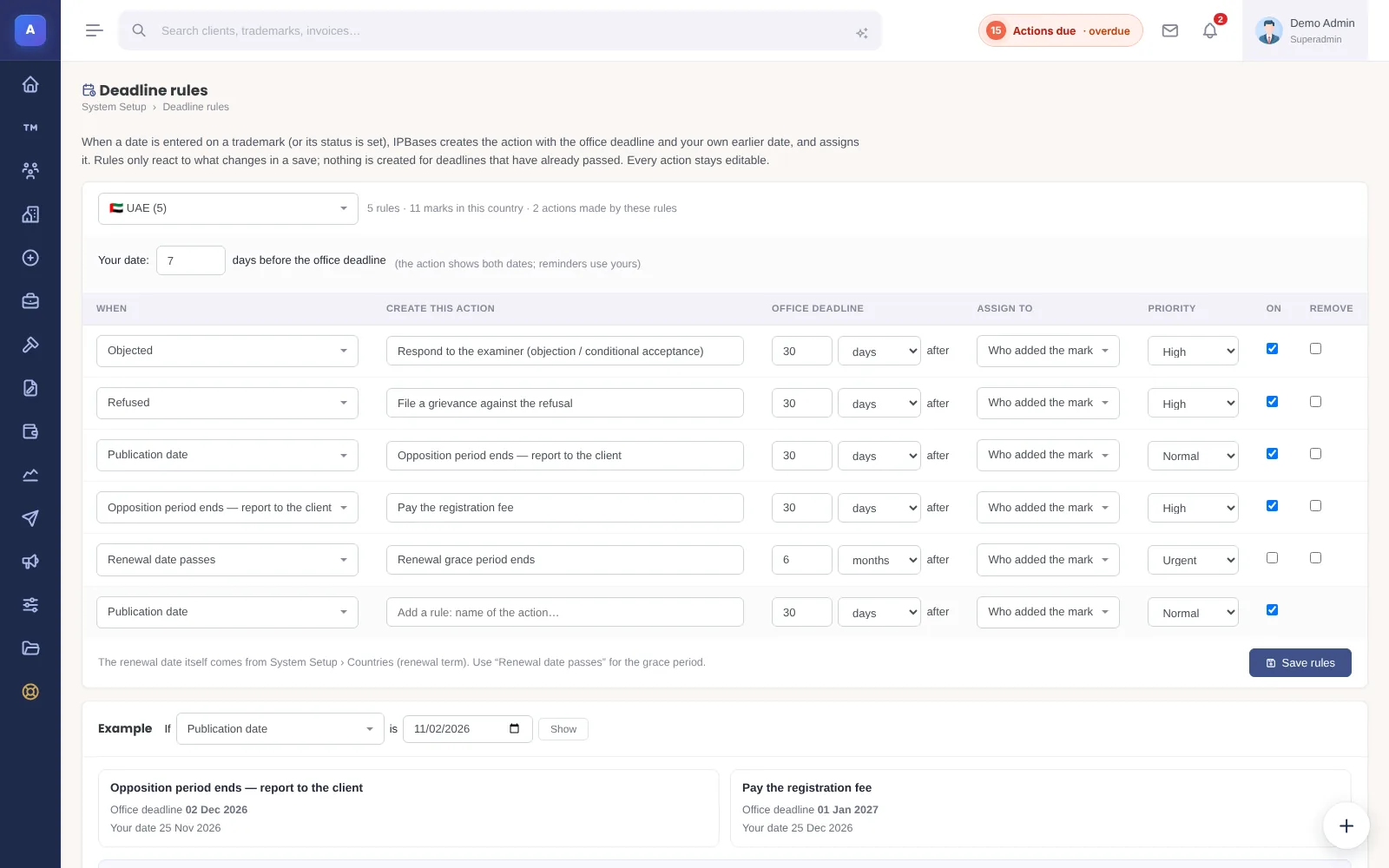
A starter set for the UAE is included as an example to check and adjust, not as a statement of the law. You can try the rules on the hands-on demo.
Frequently asked questions
What is automatic trademark docketing?
Creating deadline actions from the trademark record itself: when a date is entered or a status is set, the system creates the action with its office deadline, an internal date and an owner, instead of someone adding it to a calendar by hand.
Can deadline rules be different for each country?
They should be. Offices set different periods, so rules are defined per country and can be copied between countries and then adjusted.
Are the periods in a starter set legal advice?
No. Starter periods are examples to save typing. Every period should be confirmed against the office’s current practice by someone responsible for that office.